
How to Create an Ergonomic Executive Home Office with an L-Shaped Standing Desk
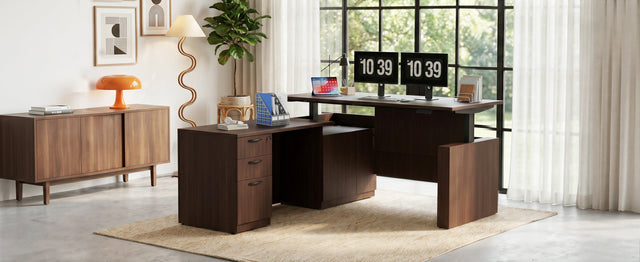
Working from home doesn’t mean sacrificing the professionalism of a corporate office. With the right setup, your home office can be just as productive—and even more comfortable. The key is choosing furniture that supports your health and workflow.
In this guide, we’ll show you how to create an executive-level home office using the 66.93" L-Shaped Executive Standing Desk as the centrepiece. From posture tips to storage hacks, you’ll learn how to make your workspace work for you.

Step 1: Choose a Desk That Adapts to You
The foundation of any ergonomic office is an adjustable desk. The 66.93" L-Shaped Executive Standing Desk offers a height range of 29.4" to 46.2", so you can switch between sitting and standing throughout the day. The dual-motor system is quiet and smooth, and the three memory presets let you jump to your ideal height instantly.
Pro Tip: Set one memory preset for sitting, one for standing, and one for a slightly higher standing position for tasks like reading or taking calls.
Step 2: Organize with Smart Storage
Clutter kills productivity. This desk comes with a fully assembled 3-drawer file cabinet, including a lockable drawer for sensitive documents. There’s also a dedicated CPU cabinet to keep your computer tower secure and off the floor.
Use the drawers to store:
-
Office supplies
-
Files and folders
-
Chargers and cables
-
Personal items
With everything in its place, you can focus on your work instead of searching for a pen.
Step 3: Position Your Monitor and Accessories
The L-shaped surface gives you plenty of room to position your monitor at eye level. Place your primary monitor on the main desk and use the return for a laptop, tablet, or reference materials. The spacious 66.93" x 29.53" main surface easily holds dual monitors or an ultrawide.
Ergonomic Checklist:
-
Top of screen at or slightly below eye level
-
Elbows at 90 degrees when typing
-
Feet flat on the floor or on a footrest
-
Wrists straight, not bent
Step 4: Manage Cables Like a Pro
Nothing ruins the look of an executive office faster than a tangle of cables. This desk features built-in cable management with channels that run from the power hub through the crossbeam to the CPU bay. Use zip ties or Velcro straps to keep cords tidy and out of sight.
Step 5: Personalize Your Space
Add a plant, a framed photo, or a desk lamp to make the space yours. The L-shape gives you room for personal touches without sacrificing work surface. And because the desk is scratch-resistant and easy to clean, it will stay looking sharp for years.
Why This Desk Stands Out
-
Pre-installed frame cuts setup time by 50–65%
-
Dual-motor lift is quiet, smooth, and reliable
-
Lockable storage keeps documents secure
-
Spacious L-shape supports multitasking
-
Durable build supports up to 275 lbs
Final Thoughts
Creating an ergonomic executive home office doesn’t require a complete remodel. Start with a quality standing desk like the 66.93" L-Shaped Executive Standing Desk, add smart storage, and pay attention to your posture. The result is a workspace that supports your health, your focus, and your professional image.